As an Amazon Associate, we earn from qualifying purchases. Some links on this site are affiliate links at no extra cost to you. Our recommendations are based on thorough research and editorial judgment.

Understanding DPI and Resolution for Art Prints

Understanding DPI, or dots per inch, is essential for producing sharp art prints. Generally, we use 300 DPI for smaller prints and at least 150 DPI for larger ones like posters. This guarantees clarity based on viewing distance. Meanwhile, PPI, or pixels per inch, affects digital images. Capturing high-resolution images with at least 12 megapixels helps maintain quality. If we avoid low-resolution sources, we’re set for success. There’s more to explore about DPI and resolution to enhance your print quality.
Key Takeaways
- DPI (dots per inch) determines print quality; 300 DPI is ideal for sharp art prints, while larger prints may use 150 DPI minimum.
- PPI (pixels per inch) relates to digital screens; maintaining high PPI and correct DPI ensures quality in both digital files and prints.
- High-resolution images capture fine details; use at least a 12-megapixel camera or scan at a minimum of 600 DPI for physical artwork.
- Lossless formats like TIFF preserve image quality better than lossy formats (JPEG), important for maintaining clarity in prints.
- Confirm DPI requirements with clients and adjust settings properly to avoid pixelation and ensure visual impact in final prints.
Understanding DPI: The Key to High-Quality Art Prints
You may be interested
When it comes to creating high-quality art prints, figuring out DPI can feel a bit overwhelming. You might be wondering, “What exactly is DPI?” Well, it stands for dots per inch, and it’s a big deal when it comes to print quality. A common choice is a DPI of 300, which usually ensures that your prints have that sharp, detailed look. If you’re working on a piece that’s going to be viewed closely—like in an exhibition—you might want to bump it up to 600 DPI to catch all those fine details.
Larger prints often require a higher DPI to keep everything clear and crisp. You probably don’t want to print something huge that ends up looking blurry. On the other hand, smaller prints can get away with a bit lower DPI. So, how do you decide what to go with? It really depends on viewing distance; if someone’s going to be right up close to your artwork, higher DPI is key to avoid losing any of those delicate details.
Here’s the trick: adjust your image resolution according to the DPI you want. This way, you won’t end up with pixelation or a blurry finish. Honestly, it’s all about keeping that professional look in your prints. Just think about how you want your artwork to be seen—do you want it sharp and vivid or are you okay with a more casual vibe?
To sum it up, understanding DPI can make a real difference in your art prints. Considering the tools you use is equally important, as employing brushes like the versatile filbert paint brushes can enhance the details and overall quality before your work even reaches the print stage. What’s your go-to DPI setting when you print?
How DPI Differs From PPI and Why It Matters?
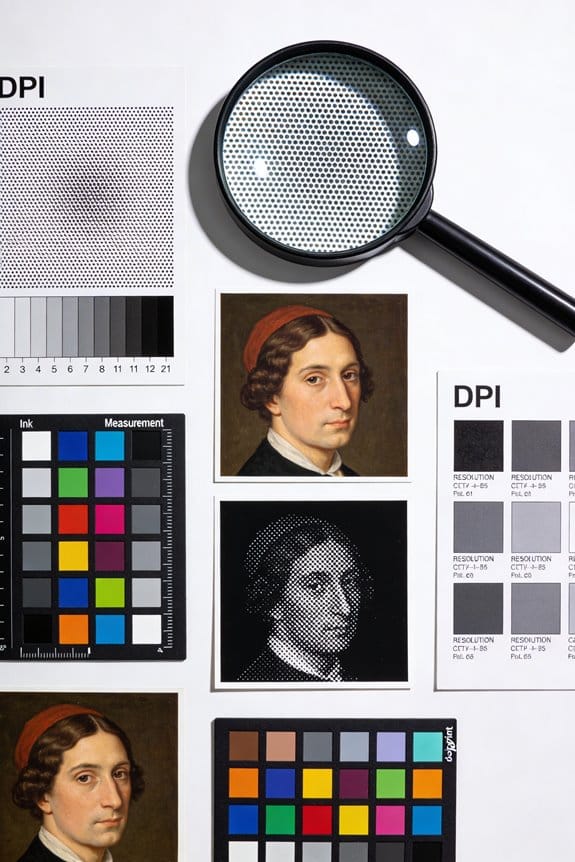
DPI and PPI can leave a lot of folks scratching their heads, especially artists and designers. What’s the difference? Let’s break it down. DPI, or Dots Per Inch, refers to how many tiny ink dots are packed into an inch of printed paper. This measurement directly affects the print quality—higher DPI means sharper and more detailed images. For fine art prints, that detail is crucial.
Then there’s PPI, which stands for Pixels Per Inch. This term relates to how many pixels are crammed into an inch on digital screens. When you’re creating images for the web or social media, PPI is your best friend. Typically, you’ll want around 300 DPI for prints, while PPI often sits somewhere between 72 for screens and 300 when you’re getting serious about printing.
So, why does this matter? Understanding the difference is key to avoiding pixelation when you transfer your beautiful digital work to paper. If your digital files maintain a high PPI and you choose the right DPI for printing services, you can ensure your final prints look amazing.
Try this: Always check your image resolution before hitting “print”. If you’re unsure, aim for that 300 DPI to be safe. Frankly, nobody wants to deal with blurry images when they’re expecting a high-quality print. With just a little attention to these details, you can produce prints that truly showcase your artwork. Also, organizing your finished prints and supplies in a customizable storage box can help maintain your creative space efficiently.
Ideal DPI for Various Print Sizes
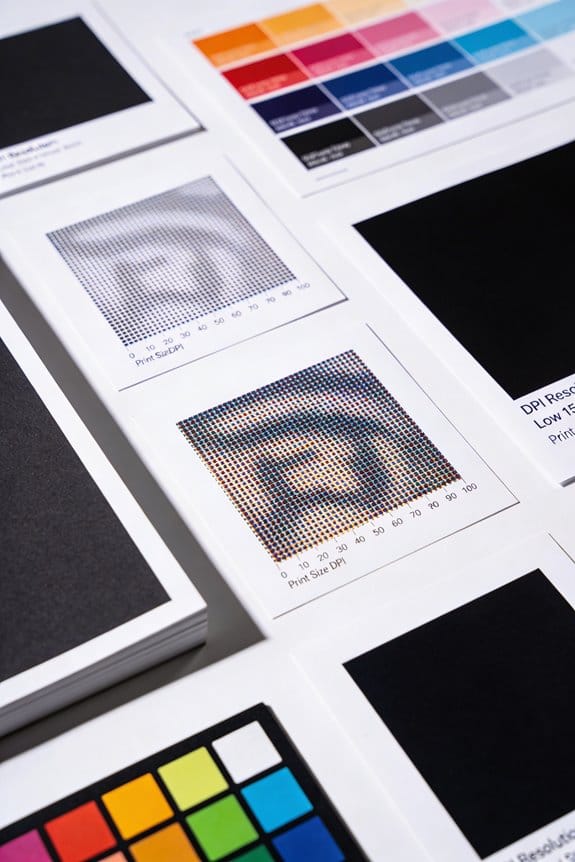
Have you ever printed something only to be disappointed with the quality? It’s frustrating, isn’t it? Choosing the right DPI for your print size can make a noticeable difference.
For those standard art prints, going for a DPI of 300 is a solid choice. This setting helps ensure that fine details really pop with clarity. You want your art to look amazing, right? The same goes for smaller prints like business cards or postcards. Sticking to that 300 DPI level is key to keeping the quality high.
When it comes to larger prints, like posters, things change a bit. I’d say a minimum of 150 DPI will still offer decent clarity. After all, these prints are usually viewed from further away. If people are standing a few feet back, a DPI of around 100 can still turn out pretty good. So, why does this matter? Well, the best DPI really depends on how far away someone will be when they look at your work.
Choosing high-quality materials like professional-grade paper can also enhance the final print’s sharpness and color vibrancy, making your art stand out even more.
Recommended Products

Large-format scanning: scan documents up to 11.7" x 17".

Take complete creative control of your images and bring them to life with the imagePROGRAF PRO-300 professional inkjet photo and fine art printer.
Epson strongly recommends the use of Genuine Epson inks for a quality printing experience. Non-Epson inks and inks not formulated for your specific printer may cause damage that is not covered by the Epson warranty.
Capture High-Resolution Images for Optimal DPI
Capturing high-resolution images can make or break your print quality. If you want your art to shine, it’s essential to have the right tools. Aim for a camera that’s got at least 12 megapixels. This way, when you print at 300 DPI, you won’t lose any of those crucial details that make your work pop.
For digital artwork, sticking with lossless formats like TIFF or RAW is a smart move. These formats keep your quality intact, ensuring that every brushstroke looks as vibrant as it did on your screen. When it comes to scanning physical pieces, opt for a scanner with a minimum of 600 DPI. This will help you capture every fine texture and line so that your scan does justice to your original work.
So, what’s next? Lighting plays a big role in how your images turn out. Try using diffused lighting to avoid harsh shadows and reflections that can muddy up clarity. The best part is, good lighting doesn’t just improve details; it can even add a certain vibrancy to your colors.
After you’ve captured your images, a quick resize is on the agenda. You want to ensure that your images maintain their ideal dimensions and DPI. It’s all about that stellar quality output you’re looking for.
Additionally, choosing the right paint finish options and understanding their impact on color vibrancy can further enhance the printed representation of your artwork.
In a nutshell, paying attention to these details will elevate your art in print. Are you ready to give your work the quality it deserves?
Recommended Products

BUCKLE UP—Along with a next-generation CPU, faster unified memory, and up to 2x faster SSD storage, M5 Pro and M5 Max feature a more powerful GPU with a Neural Accelerator built into each core, delivering faster AI performance and on-device training capabilities. So you can blaze through demanding workloads at mind-bending speeds.
BUCKLE UP—Along with a next-generation CPU, faster unified memory, and up to 2x faster SSD storage, M5 Pro and M5 Max feature a more powerful GPU with a Neural Accelerator built into each core, delivering faster AI performance and on-device training capabilities. So you can blaze through demanding workloads at mind-bending speeds.

Ultra High Definition 6K 12MP (4512x2512) SIX TIMES the resolution of 1080P! 64 Channel H.265+ 12MP NVR Security Camera System with (32) 6K 12MP Weatherproof 145° Diagonal Wide FOV H.265+ Starlight Color Night Vision PoE IP Dome Cameras (Built-in Microphone)
Top Pitfalls to Avoid in Art Printing
Ever had your artwork printed, only to be disappointed by the result? It happens to the best of us. To make sure you get the vibrant, detailed prints you expect, there are a few common pitfalls to keep in mind.
First off, let’s talk about image resolution. Using low-res images leads to pixelation, which can totally ruin the detail in your prints. Aim for images at 300 DPI for high-quality results. If you’re going big with your prints, remember that larger sizes require a higher DPI to stay sharp. Otherwise, your artwork might end up looking blurred rather than beautiful.
Don’t overlook the viewing distance, either. If someone’s going to see your art up close, you definitely want that higher DPI. It’s crucial for getting those stunning details just right.
Now, about file formats: this can be a bit tricky. Lossless formats like TIFF are your friends since they preserve image quality much better than lossy formats like JPEG. If you want to keep your art looking its best, choose wisely.
Lastly, make sure to double-check the DPI and look for any resolution issues before you hit that print button. This simple step can make a huge difference in the final product.
Understanding the principles of color theory can also help you anticipate how colors will reproduce in print, ensuring your artwork maintains its intended vibrancy.
Ensuring Proper DPI Settings for Successful Printing
Have you ever sent a print job only to be disappointed by the final product? Getting your prints to look just right often hinges on the DPI settings you use. For those high-quality art prints, sticking to a standard of 300 DPI is crucial for capturing sharp images and intricate details. But if you’re creating larger prints that people will mainly view from a distance, you can go as low as 100 DPI. This lower setting generally does a good job without losing too much quality.
Honestly, as the viewing distance increases, you can safely reduce DPI without worrying about pixelation or blurriness. It’s a little trick I’ve picked up over time. Just remember to make those DPI adjustments with resizing tools, while keeping your original files intact for any future needs.
Another thing to keep in mind is confirming DPI needs with your clients or the print shop. This is key to ensuring your artwork retains its visual impact and meets the required print resolution. So, what’s your go-to method for checking DPI? It can feel overwhelming, but with the right settings, you’ll be on your way to beautiful prints in no time! Proper surface compatibility ensures the best print results across different materials.
Recommended Products

Product Type: Inkjet Printer, Recommended Use: Plain Paper Print, Print Color Capability: Color, Maximum Mono Print Speed (ppm): 23, Maximum Color Print Speed (ppm): 14, Maximum Print Resolution: 5760 x 1440 dpi, Color Cartridge Type: Individual Color Cartridge

Maximum Scan size - 11.7"x 17" (297 x 431.8 mm) Large Format Scanning, easy digital Tabloid or A3 size paper.

All-in-One Convenience - Print and Cut in One Step. Say goodbye to the hassle of using separate machines. The PixCut S1 seamlessly integrates high-resolution photo printing and precise die cutting into one streamlined device. With just a few clicks on the user-friendly app, you can edit, print, and cut directly from your smartphone via Bluetooth. Create stickers in just 2 minutes! The Inspire Kit includes 36 photo papers and 144 sticker papers, so you can create endlessly without running out.
Frequently Asked Questions
What Is a Good DPI for Art Prints?
For art print quality, we recommend 300 DPI to guarantee image sharpness and color accuracy. Depending on print size and customer expectations, we can explore various scanning tips and editing techniques to enhance digital artwork.
What Is the Best Resolution for a 24X36 Print?
For a 24×36 print, we should aim for 300 DPI to guarantee the best print quality and image clarity. Considering scaling techniques, file formats, and color profiles enhances our art reproduction based on printer capabilities and viewing distance.
Is 600 or 1200 DPI Better for Printing?
In the garden of print quality, we find 600 and 1200 DPI blooming side by side. While 1200 offers sharper petals of detail, 600 nurtures vibrant colors at lower printing costs without sacrificing image sharpness for large prints.
Is 300 or 600 DPI Better for Art?
For art, we believe 300 DPI strikes the right balance for print quality and image clarity. However, 600 DPI enhances color accuracy, especially on larger artworks, so it’s worth considering specific file formats and printing techniques.


